[Terraform] EKS용 VPC 구성하기
Terraform
IaC 의 대표적인 툴로 클라우드 인프라를 코드로 관리할 수 있게 해주는 툴이다. hcl 이라는 자체 언어를 사용하는데 단순히 Cloud Resource 생성 뿐만이 아니라 Kubernetes Resource도 생성이 가능하다.
VPC
AWS 서비스를 구성할 때 항상 고려하게 되는 것이 VPC의 구성이다. Virtual Private Cloud의 약자로 Private Network 라고 보면 된다. VPC는 subnet을 통해 또 한번 분리되며 public / private subnet으로 구분된다. AWS 에서 public subnet 은 외부(인터넷)에서 접근이 가능한 네트워크 대역이며 private subnet 은 외부에서 직접적인 연결이 불가능한 네트워크 대역이다.
private subnet 이 외부와 통신을 하기 위해서는 public subnet 영역에 NAT Gateway를 만들어야 한다. public subnet에는 Internet gateway 를 생성하여 외부와 연결한다.
구성도
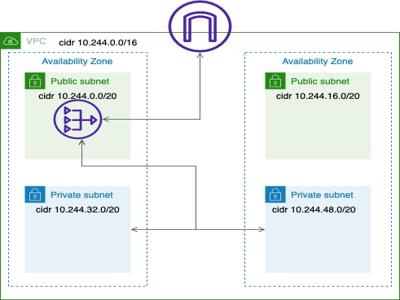
Router와 ACL 은 생략한 구성도.
CODE
# directory 구성
* main.tf
* terraform.auto.tfvars
* variables.tf
* vpc.tf
#main.tf
provider "aws" {
  region = var.region
}
main.tf 에는 provider 정보를 명시해준다.
#variables.tf
variable region {
  type = string
  default = "ap-northeast-2"
}

variable availability_zones{
  description = "AZ info"
  type = list(string)
  default = ["ap-northeast-2a", "ap-northeast-2c"]
}

variable "vpc_name" {
  description = "VPC name"
  type = string
  default = null
}

variable "vpc_cidr" {
  description = "VPC CIDR"
  type = string
  default = null
}
variables.tf 는 이 모듈에서 사용할 변수들의 정보를 기술한다. 현재 variables.tf 에는 region, availability_zones, vpc_name, vpc_cidr 4가지 정보를 입력받는다.
# terraform.auto.tfvars
vpc_name = "dhkim-eks-vpc"
vpc_cidr = "10.244.0.0/16"
terraform.auto.tfvars 파일에 변수 값을 작성하여 자동으로 적용되게 한다.
#vpc.tf
module "vpc" {
  source = "terraform-aws-modules/vpc/aws"

  name = var.vpc_name
  azs = var.availability_zones
  cidr = var.vpc_cidr

  enable_nat_gateway = true
  single_nat_gateway = true

  public_subnets = [for index in range(2) :
                        cidrsubnet(var.vpc_cidr, 4, index)]
  private_subnets = [for index in range(2) :
                        cidrsubnet(var.vpc_cidr, 4, index+2)]
}
EKS용 VPC를 구성할 때 terraform-aws-modules/vpc/aws 모듈을 이용하면 네트워크 설정을 간소화 시킬 수 있다. 외부 모듈을 이용하지 않고 직접 만든다면 security group, acl, routing table 등의 정보를 전부 작성해줘야 하지만 이 모듈을 이용하면 그런 과정을 자동으로 처리해준다.
name, azs, cidr 변수를 입력해준다. private network 와 연결할 NAT Gateway 를 사용할 것을 명시하고 AZ 별로 NAT Gateway를 생성하지는 않을것이기 때문에 single_nat_gateway 변수에 true를 입력해준다.
public_subnets, private subnets 는 cidrsubnet 함수를 이용하여 대역값을 생성해준다.
모든 작업이 끝났다면 쉘에서 다음 명령어를 실행시킨다.
$ terraform init
위 명령어를 실행 시킨다면 아래와 유사한 출력이 만들어진다.
#terraform init output
Initializing modules...
Downloading registry.terraform.io/terraform-aws-modules/vpc/aws 3.19.0 for vpc...
- vpc in .terraform/modules/vpc

Initializing the backend...

Initializing provider plugins...
- Finding hashicorp/aws versions matching ">= 3.73.0"...
- Installing hashicorp/aws v4.57.1...
- Installed hashicorp/aws v4.57.1 (signed by HashiCorp)

Terraform has created a lock file .terraform.lock.hcl to record the provider
selections it made above. Include this file in your version control repository
so that Terraform can guarantee to make the same selections by default when
you run "terraform init" in the future.

Terraform has been successfully initialized!

You may now begin working with Terraform. Try running "terraform plan" to see
any changes that are required for your infrastructure. All Terraform commands
should now work.

If you ever set or change modules or backend configuration for Terraform,
rerun this command to reinitialize your working directory. If you forget, other
commands will detect it and remind you to do so if necessary.
해당 디렉토리에는 .terraform 디렉토리와 .terraform.lock.hcl 파일이 생성된다. 이제 실제 리소스를 AWS에 생성할 차례이다. 아래 명령어를 실행한다.
$ terraform apply
명령 수행을 위한 확인을 요구하기 때문에 yes 를 입력하면 aws resource 생성을 수행한다. 이 예제에서는 NAT Gateway 생성에 시간을 소비하기 때문에 잠시 기다린다. 수행이 끝났다면 아래와 같은 log가 출력된다.
Terraform used the selected providers to generate the following execution plan. Resource actions are indicated with the following symbols:
  + create

Terraform will perform the following actions:

  # module.vpc.aws_eip.nat[0] will be created
  + resource "aws_eip" "nat" {
      + allocation_id        = (known after apply)
      + association_id       = (known after apply)
      + carrier_ip           = (known after apply)
      + customer_owned_ip    = (known after apply)
      + domain               = (known after apply)
      + id                   = (known after apply)
      + instance             = (known after apply)
      + network_border_group = (known after apply)
      + network_interface    = (known after apply)
      + private_dns          = (known after apply)
      + private_ip           = (known after apply)
      + public_dns           = (known after apply)
      + public_ip            = (known after apply)
      + public_ipv4_pool     = (known after apply)
      + tags                 = {
          + "Name" = "dhkim-eks-vpc-ap-northeast-2a"
        }
      + tags_all             = {
          + "Name" = "dhkim-eks-vpc-ap-northeast-2a"
        }
      + vpc                  = true
    }

  # module.vpc.aws_internet_gateway.this[0] will be created
  + resource "aws_internet_gateway" "this" {
      + arn      = (known after apply)
      + id       = (known after apply)
      + owner_id = (known after apply)
      + tags     = {
          + "Name" = "dhkim-eks-vpc"
        }
      + tags_all = {
          + "Name" = "dhkim-eks-vpc"
        }
      + vpc_id   = (known after apply)
    }

  # module.vpc.aws_nat_gateway.this[0] will be created
  + resource "aws_nat_gateway" "this" {
      + allocation_id        = (known after apply)
      + connectivity_type    = "public"
      + id                   = (known after apply)
      + network_interface_id = (known after apply)
      + private_ip           = (known after apply)
      + public_ip            = (known after apply)
      + subnet_id            = (known after apply)
      + tags                 = {
          + "Name" = "dhkim-eks-vpc-ap-northeast-2a"
        }
      + tags_all             = {
          + "Name" = "dhkim-eks-vpc-ap-northeast-2a"
        }
    }

  # module.vpc.aws_route.private_nat_gateway[0] will be created
  + resource "aws_route" "private_nat_gateway" {
      + destination_cidr_block = "0.0.0.0/0"
      + id                     = (known after apply)
      + instance_id            = (known after apply)
      + instance_owner_id      = (known after apply)
      + nat_gateway_id         = (known after apply)
      + network_interface_id   = (known after apply)
      + origin                 = (known after apply)
      + route_table_id         = (known after apply)
      + state                  = (known after apply)

      + timeouts {
          + create = "5m"
        }
    }

  # module.vpc.aws_route.public_internet_gateway[0] will be created
  + resource "aws_route" "public_internet_gateway" {
      + destination_cidr_block = "0.0.0.0/0"
      + gateway_id             = (known after apply)
      + id                     = (known after apply)
      + instance_id            = (known after apply)
      + instance_owner_id      = (known after apply)
      + network_interface_id   = (known after apply)
      + origin                 = (known after apply)
      + route_table_id         = (known after apply)
      + state                  = (known after apply)

      + timeouts {
          + create = "5m"
        }
    }

  # module.vpc.aws_route_table.private[0] will be created
  + resource "aws_route_table" "private" {
      + arn              = (known after apply)
      + id               = (known after apply)
      + owner_id         = (known after apply)
      + propagating_vgws = (known after apply)
      + route            = (known after apply)
      + tags             = {
          + "Name" = "dhkim-eks-vpc-private"
        }
      + tags_all         = {
          + "Name" = "dhkim-eks-vpc-private"
        }
      + vpc_id           = (known after apply)
    }

  # module.vpc.aws_route_table.public[0] will be created
  + resource "aws_route_table" "public" {
      + arn              = (known after apply)
      + id               = (known after apply)
      + owner_id         = (known after apply)
      + propagating_vgws = (known after apply)
      + route            = (known after apply)
      + tags             = {
          + "Name" = "dhkim-eks-vpc-public"
        }
      + tags_all         = {
          + "Name" = "dhkim-eks-vpc-public"
        }
      + vpc_id           = (known after apply)
    }

  # module.vpc.aws_route_table_association.private[0] will be created
  + resource "aws_route_table_association" "private" {
      + id             = (known after apply)
      + route_table_id = (known after apply)
      + subnet_id      = (known after apply)
    }

  # module.vpc.aws_route_table_association.private[1] will be created
  + resource "aws_route_table_association" "private" {
      + id             = (known after apply)
      + route_table_id = (known after apply)
      + subnet_id      = (known after apply)
    }

  # module.vpc.aws_route_table_association.public[0] will be created
  + resource "aws_route_table_association" "public" {
      + id             = (known after apply)
      + route_table_id = (known after apply)
      + subnet_id      = (known after apply)
    }

  # module.vpc.aws_route_table_association.public[1] will be created
  + resource "aws_route_table_association" "public" {
      + id             = (known after apply)
      + route_table_id = (known after apply)
      + subnet_id      = (known after apply)
    }

  # module.vpc.aws_subnet.private[0] will be created
  + resource "aws_subnet" "private" {
      + arn                                            = (known after apply)
      + assign_ipv6_address_on_creation                = false
      + availability_zone                              = "ap-northeast-2a"
      + availability_zone_id                           = (known after apply)
      + cidr_block                                     = "10.244.32.0/20"
      + enable_dns64                                   = false
      + enable_resource_name_dns_a_record_on_launch    = false
      + enable_resource_name_dns_aaaa_record_on_launch = false
      + id                                             = (known after apply)
      + ipv6_cidr_block_association_id                 = (known after apply)
      + ipv6_native                                    = false
      + map_public_ip_on_launch                        = false
      + owner_id                                       = (known after apply)
      + private_dns_hostname_type_on_launch            = (known after apply)
      + tags                                           = {
          + "Name" = "dhkim-eks-vpc-private-ap-northeast-2a"
        }
      + tags_all                                       = {
          + "Name" = "dhkim-eks-vpc-private-ap-northeast-2a"
        }
      + vpc_id                                         = (known after apply)
    }

  # module.vpc.aws_subnet.private[1] will be created
  + resource "aws_subnet" "private" {
      + arn                                            = (known after apply)
      + assign_ipv6_address_on_creation                = false
      + availability_zone                              = "ap-northeast-2c"
      + availability_zone_id                           = (known after apply)
      + cidr_block                                     = "10.244.48.0/20"
      + enable_dns64                                   = false
      + enable_resource_name_dns_a_record_on_launch    = false
      + enable_resource_name_dns_aaaa_record_on_launch = false
      + id                                             = (known after apply)
      + ipv6_cidr_block_association_id                 = (known after apply)
      + ipv6_native                                    = false
      + map_public_ip_on_launch                        = false
      + owner_id                                       = (known after apply)
      + private_dns_hostname_type_on_launch            = (known after apply)
      + tags                                           = {
          + "Name" = "dhkim-eks-vpc-private-ap-northeast-2c"
        }
      + tags_all                                       = {
          + "Name" = "dhkim-eks-vpc-private-ap-northeast-2c"
        }
      + vpc_id                                         = (known after apply)
    }

  # module.vpc.aws_subnet.public[0] will be created
  + resource "aws_subnet" "public" {
      + arn                                            = (known after apply)
      + assign_ipv6_address_on_creation                = false
      + availability_zone                              = "ap-northeast-2a"
      + availability_zone_id                           = (known after apply)
      + cidr_block                                     = "10.244.0.0/20"
      + enable_dns64                                   = false
      + enable_resource_name_dns_a_record_on_launch    = false
      + enable_resource_name_dns_aaaa_record_on_launch = false
      + id                                             = (known after apply)
      + ipv6_cidr_block_association_id                 = (known after apply)
      + ipv6_native                                    = false
      + map_public_ip_on_launch                        = true
      + owner_id                                       = (known after apply)
      + private_dns_hostname_type_on_launch            = (known after apply)
      + tags                                           = {
          + "Name" = "dhkim-eks-vpc-public-ap-northeast-2a"
        }
      + tags_all                                       = {
          + "Name" = "dhkim-eks-vpc-public-ap-northeast-2a"
        }
      + vpc_id                                         = (known after apply)
    }

  # module.vpc.aws_subnet.public[1] will be created
  + resource "aws_subnet" "public" {
      + arn                                            = (known after apply)
      + assign_ipv6_address_on_creation                = false
      + availability_zone                              = "ap-northeast-2c"
      + availability_zone_id                           = (known after apply)
      + cidr_block                                     = "10.244.16.0/20"
      + enable_dns64                                   = false
      + enable_resource_name_dns_a_record_on_launch    = false
      + enable_resource_name_dns_aaaa_record_on_launch = false
      + id                                             = (known after apply)
      + ipv6_cidr_block_association_id                 = (known after apply)
      + ipv6_native                                    = false
      + map_public_ip_on_launch                        = true
      + owner_id                                       = (known after apply)
      + private_dns_hostname_type_on_launch            = (known after apply)
      + tags                                           = {
          + "Name" = "dhkim-eks-vpc-public-ap-northeast-2c"
        }
      + tags_all                                       = {
          + "Name" = "dhkim-eks-vpc-public-ap-northeast-2c"
        }
      + vpc_id                                         = (known after apply)
    }

  # module.vpc.aws_vpc.this[0] will be created
  + resource "aws_vpc" "this" {
      + arn                                  = (known after apply)
      + cidr_block                           = "10.244.0.0/16"
      + default_network_acl_id               = (known after apply)
      + default_route_table_id               = (known after apply)
      + default_security_group_id            = (known after apply)
      + dhcp_options_id                      = (known after apply)
      + enable_classiclink                   = (known after apply)
      + enable_classiclink_dns_support       = (known after apply)
      + enable_dns_hostnames                 = false
      + enable_dns_support                   = true
      + enable_network_address_usage_metrics = (known after apply)
      + id                                   = (known after apply)
      + instance_tenancy                     = "default"
      + ipv6_association_id                  = (known after apply)
      + ipv6_cidr_block                      = (known after apply)
      + ipv6_cidr_block_network_border_group = (known after apply)
      + main_route_table_id                  = (known after apply)
      + owner_id                             = (known after apply)
      + tags                                 = {
          + "Name" = "dhkim-eks-vpc"
        }
      + tags_all                             = {
          + "Name" = "dhkim-eks-vpc"
        }
    }

Plan: 16 to add, 0 to change, 0 to destroy.

Do you want to perform these actions?
  Terraform will perform the actions described above.
  Only 'yes' will be accepted to approve.

  Enter a value: yes

module.vpc.aws_eip.nat[0]: Creating...
module.vpc.aws_vpc.this[0]: Creating...
module.vpc.aws_eip.nat[0]: Creation complete after 0s [id=eipalloc-02d389283c17023e7]
module.vpc.aws_vpc.this[0]: Creation complete after 1s [id=vpc-06fd43c02eb85ea5b]
module.vpc.aws_subnet.private[0]: Creating...
module.vpc.aws_internet_gateway.this[0]: Creating...
module.vpc.aws_route_table.private[0]: Creating...
module.vpc.aws_route_table.public[0]: Creating...
module.vpc.aws_subnet.private[1]: Creating...
module.vpc.aws_subnet.public[1]: Creating...
module.vpc.aws_subnet.public[0]: Creating...
module.vpc.aws_route_table.private[0]: Creation complete after 0s [id=rtb-06a60f4ece48049b4]
module.vpc.aws_subnet.private[0]: Creation complete after 0s [id=subnet-09b709a11284b444f]
module.vpc.aws_route_table.public[0]: Creation complete after 0s [id=rtb-0766ac37d0efbc3aa]
module.vpc.aws_subnet.private[1]: Creation complete after 0s [id=subnet-094f2557225b8155d]
module.vpc.aws_route_table_association.private[0]: Creating...
module.vpc.aws_route_table_association.private[1]: Creating...
module.vpc.aws_internet_gateway.this[0]: Creation complete after 0s [id=igw-02aae4129f7a87c3f]
module.vpc.aws_route.public_internet_gateway[0]: Creating...
module.vpc.aws_route_table_association.private[1]: Creation complete after 0s [id=rtbassoc-0d4f22d14c74a3b5c]
module.vpc.aws_route_table_association.private[0]: Creation complete after 1s [id=rtbassoc-09b16394e0f388158]
module.vpc.aws_route.public_internet_gateway[0]: Creation complete after 1s [id=r-rtb-0766ac37d0efbc3aa1080289494]
module.vpc.aws_subnet.public[1]: Still creating... [10s elapsed]
module.vpc.aws_subnet.public[0]: Still creating... [10s elapsed]
module.vpc.aws_subnet.public[0]: Creation complete after 10s [id=subnet-0cc970674205058bd]
module.vpc.aws_subnet.public[1]: Creation complete after 10s [id=subnet-054541c425cf2968a]
module.vpc.aws_route_table_association.public[0]: Creating...
module.vpc.aws_route_table_association.public[1]: Creating...
module.vpc.aws_nat_gateway.this[0]: Creating...
module.vpc.aws_route_table_association.public[1]: Creation complete after 1s [id=rtbassoc-06976ca1efd144e52]
module.vpc.aws_route_table_association.public[0]: Creation complete after 1s [id=rtbassoc-0b4c7bc25730b5711]
module.vpc.aws_nat_gateway.this[0]: Still creating... [10s elapsed]
module.vpc.aws_nat_gateway.this[0]: Still creating... [20s elapsed]
module.vpc.aws_nat_gateway.this[0]: Still creating... [30s elapsed]
module.vpc.aws_nat_gateway.this[0]: Still creating... [40s elapsed]
module.vpc.aws_nat_gateway.this[0]: Still creating... [50s elapsed]
module.vpc.aws_nat_gateway.this[0]: Still creating... [1m0s elapsed]
module.vpc.aws_nat_gateway.this[0]: Still creating... [1m10s elapsed]
module.vpc.aws_nat_gateway.this[0]: Still creating... [1m20s elapsed]
module.vpc.aws_nat_gateway.this[0]: Still creating... [1m30s elapsed]
module.vpc.aws_nat_gateway.this[0]: Still creating... [1m40s elapsed]
module.vpc.aws_nat_gateway.this[0]: Still creating... [1m50s elapsed]
module.vpc.aws_nat_gateway.this[0]: Still creating... [2m0s elapsed]
module.vpc.aws_nat_gateway.this[0]: Creation complete after 2m5s [id=nat-096294a9455f05f8d]
module.vpc.aws_route.private_nat_gateway[0]: Creating...
module.vpc.aws_route.private_nat_gateway[0]: Creation complete after 0s [id=r-rtb-06a60f4ece48049b41080289494]

Apply complete! Resources: 16 added, 0 changed, 0 destroyed.
이제 aws console을 통해 실제 리소스의 생성을 확인해보자.
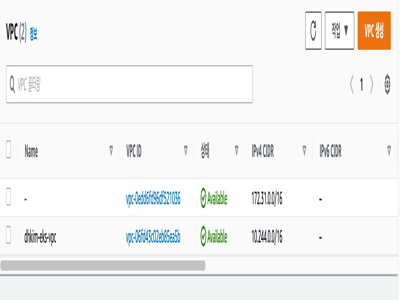
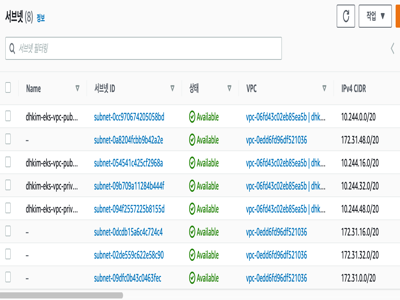
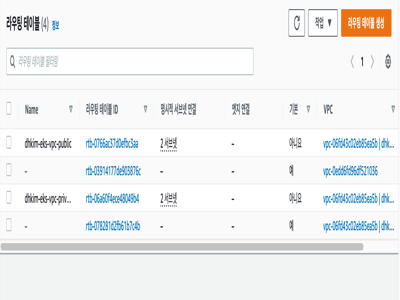
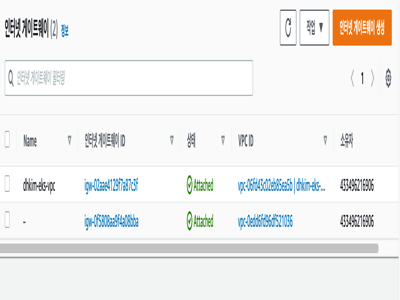
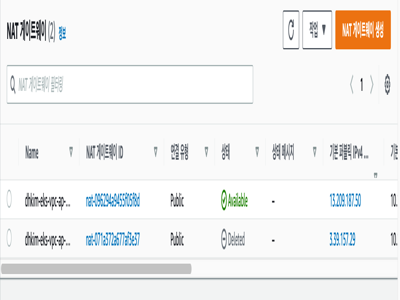
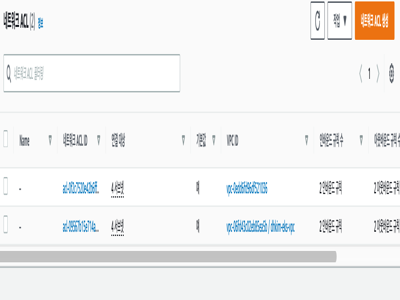
vpc와 routing table, subnet, nat gateway 등 필요한 네트워크 리소스들이 로그와 일치하는 것을 확인할 수 있다. 다음에는 vpc의 output 을 따로 저장하고 이를 별도의 모듈로 분리한 뒤 eks 클러스터를 실제로 생성하는 내용을 정리해서 올리려고한다.